
Data protection and third-party services
This page brings together the data protection topics that would otherwise be spread across many features: which services outside 5sDesk receive data, when that happens, and what happens to the data when your organisation is deleted or reset. It is aimed at admins who maintain a record of processing activities or a privacy policy.
Third-party services at a glance
Section titled “Third-party services at a glance”5sDesk itself is operated by SWT Media & Software GmbH in Germany and hosted by Hetzner Online GmbH in Germany. All other services are optional. They only become active when an admin or an agent deliberately connects them.
| Service | Purpose | Who switches it on | What data is sent |
|---|---|---|---|
| Anthropic PBC (USA) or OpenAI (USA) | AI features: draft replies, check reply, summaries, CRM prefill, translations, article drafts | An admin under “AI features”, and only after ticking the consent checkbox | The content of the conversation in question: customer emails, your own replies, internal notes, file names of attachments, the typed draft. Never the content of attachments |
| Microsoft (Microsoft 365, Microsoft Graph) | Mailboxes with “Login with Microsoft”, calendar for Teams appointments | An admin for the mailbox, each agent for their own calendar | Emails in the connected mailbox, calendar entries and free/busy times, appointment data |
| Microsoft Teams (Bot Framework) | Notifications to agents in Teams | Each agent in “My Profile” | Notification texts, for example a ticket’s subject and link |
| Google (Google Calendar) | Calendar for Google Meet appointments | Each agent in “My Profile” | Calendar entries, free/busy times, appointment data |
| Paddle | Billing for the 5sDesk subscription | The owner under “Billing & plan” | Only your organisation’s contract and payment data, no customer data from tickets |
The bot protection for public forms and appointment booking (ALTCHA) runs inside 5sDesk. No external service is involved.
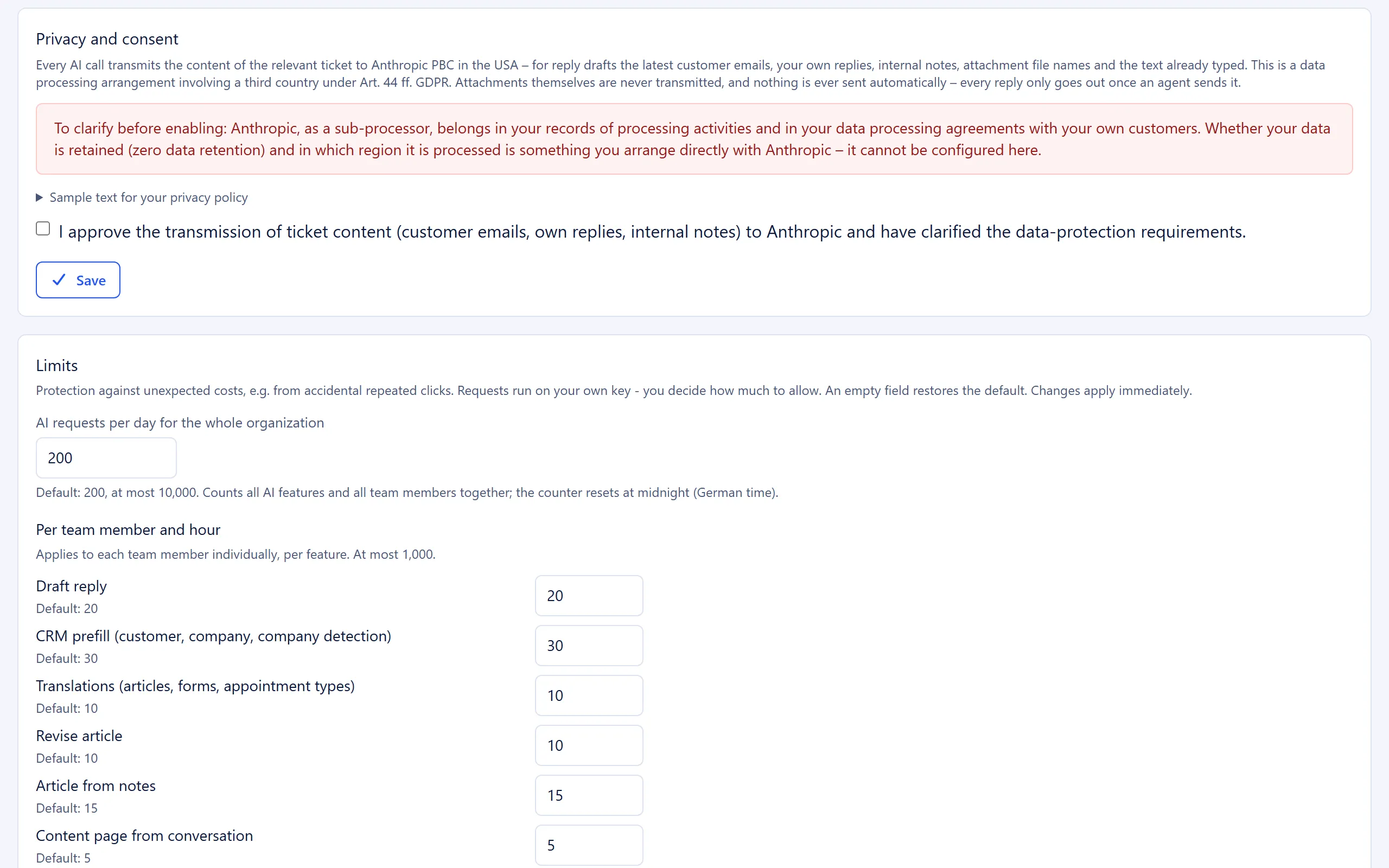
AI: what to clarify before approval
Section titled “AI: what to clarify before approval”Before you give approval, the AI settings show a notice that the selected provider must be listed as a sub-processor in your record of processing activities and in your data processing agreements. Whether the provider stores your data (zero data retention) and in which region it processes it is something you agree directly with the provider. You cannot configure this in 5sDesk.
The approval is stored with the time and the name of the admin who gave it (“Approved on …”). Switching provider from Claude to OpenAI or back does not require a new approval. So check your contracts every time you switch provider.
What the AI never does is described on the AI features page: no automatic sending, no automatic marketing consent, no links in AI texts.
Privacy policy and legal notice
Section titled “Privacy policy and legal notice”Under “Legal”, 5sDesk generates drafts of a legal notice (Impressum) and a privacy policy from your company details. The drafts contain placeholders for the optional services you have enabled, for example “[e.g. Anthropic]”. Replace these placeholders before you publish the pages.
Each draft starts with a note in bold saying that it is an automatically generated suggestion and not legal advice. This note is part of the text. It stays on the public page until you remove it.
For the AI features, the “AI features” page also offers the expandable “Sample text for your privacy policy”. This text is a suggestion too. Check it before you use it.
Records 5sDesk keeps
Section titled “Records 5sDesk keeps”| Process | What is stored | What is not stored |
|---|---|---|
| Marketing consent | Event (given, withdrawn, confirmation pending, request cancelled), source, time, name of the agent | The customer’s IP address and browser |
| AI requests | The complete history of every request, including the content transmitted and the response, visible in the “AI Log” (admins only, last 200 requests) | |
| Agent sign-in | A random session token per login | IP address and device identifier |
You can read more about marketing consent on the CRM and customer data page.
Deleting and resetting the organisation
Section titled “Deleting and resetting the organisation”Admins find both options under “Manage account”. Both actions require you to type an exact confirmation and then click a link in a confirmation email.
Permanently deleting the organisation
Section titled “Permanently deleting the organisation”Any admin can request “delete account permanently”. This deletes all tickets, messages, customers, companies, boards and cards, appointments, time entries, users and uploaded files. The AI log and the marketing consent history are deleted as well, because both belong to the organisation. All users lose access immediately. Your organisation’s address can no longer be reached afterwards.
Resetting all data
Section titled “Resetting all data”Only the owner can “reset all data”. This deletes the same content and resets all settings to the state right after sign-up. All users except the owner are removed, and connected mailboxes and calendars are disconnected. The organisation and the owner’s access remain.
Deleting individual records
Section titled “Deleting individual records”| What you delete | What is deleted with it | What remains |
|---|---|---|
| Customer | Additional email addresses, marketing consent history, open confirmation links, portal login links | Tickets and cards are kept and only lose the link to the customer |
| Company | Only possible once no customers are linked to it | |
| Ticket | Messages, attachments, the AI summary and the related entries in the AI log | |
| User | Users are never deleted, only locked or permanently deactivated | The history stays readable |
| Card | Archive it first, then use “Delete permanently” |
Merged duplicates are deleted. Their marketing consent history is kept: it is combined with the history of the customer you keep. The duplicate’s email addresses also stay stored as additional addresses of the customer you keep. For details, see the “Duplicate customers/companies” page.
CSV import of customers and companies
Section titled “CSV import of customers and companies”During a CSV import, 5sDesk stores the uploaded file temporarily:
- An import that is not started stays stored as a draft including the file. 5sDesk deletes it after 24 hours with the next upload. “Discard import” deletes it immediately.
- After the import, the content of the file is deleted.
- Rows that were not imported stay stored with their original values on the import, at most 5,000 per import. They make up the “Error list (CSV)”. These rows can contain names, email addresses and other contact details.
See also
Section titled “See also”- AI features: a plain-language description of the data flows.
- “AI features” (settings): approval, provider, log.
- “Legal”: generate a legal notice and privacy policy.
- “Manage account”: deleting and resetting.
- Roles and permissions: who can carry out these actions.