
Outgoing webhooks
On this page you set up webhook endpoints that 5sDesk automatically sends a signed request to when events happen (new ticket, changed customer, moved card). Only admins can see this page.
Where to find the page
Section titled “Where to find the page”Administration › Settings › Boards & AI › “Outgoing webhooks”.
Settings overview
Section titled “Settings overview”The notice at the top of the page reads: “5sDesk sends a signed POST request to your endpoint for every subscribed event. Failed deliveries are retried several times (1 minute, 5 minutes, 30 minutes, 2 hours, 12 hours).”
“Endpoints” list
Section titled ““Endpoints” list”Each organisation can have up to 10 endpoints. Once the limit is reached, “Maximum of 10 endpoints per organisation reached.” replaces the “New endpoint” button.
Each entry shows the endpoint URL, the description, the subscribed events (or “All events”), “Secret:” with the beginning and the last four characters of the secret, “Last success:”, “Last failure:” and the status “Active” or “Off”.
| Action | Effect |
|---|---|
| “Deliveries” | Opens the “Recent deliveries” page (see below). |
| “Edit” | Opens “Edit webhook endpoint”. Changing the URL resets the failure count. |
| “Test” | Immediately sends an event of type ping and reports “Test succeeded: HTTP 200 in 123 ms.” or “Test failed: …”. The test is not retried and does not appear in the deliveries. |
| “Disable” / “Enable” | Switches the endpoint off or back on (“Endpoint disabled.”, “Endpoint enabled.”). Enabling resets the failure count. |
| “Rotate secret” | Generates a new secret and shows it once. |
| “Delete” | Removes the endpoint and its deliveries immediately (“Endpoint deleted.”). |
“New webhook endpoint” and “Edit webhook endpoint” form
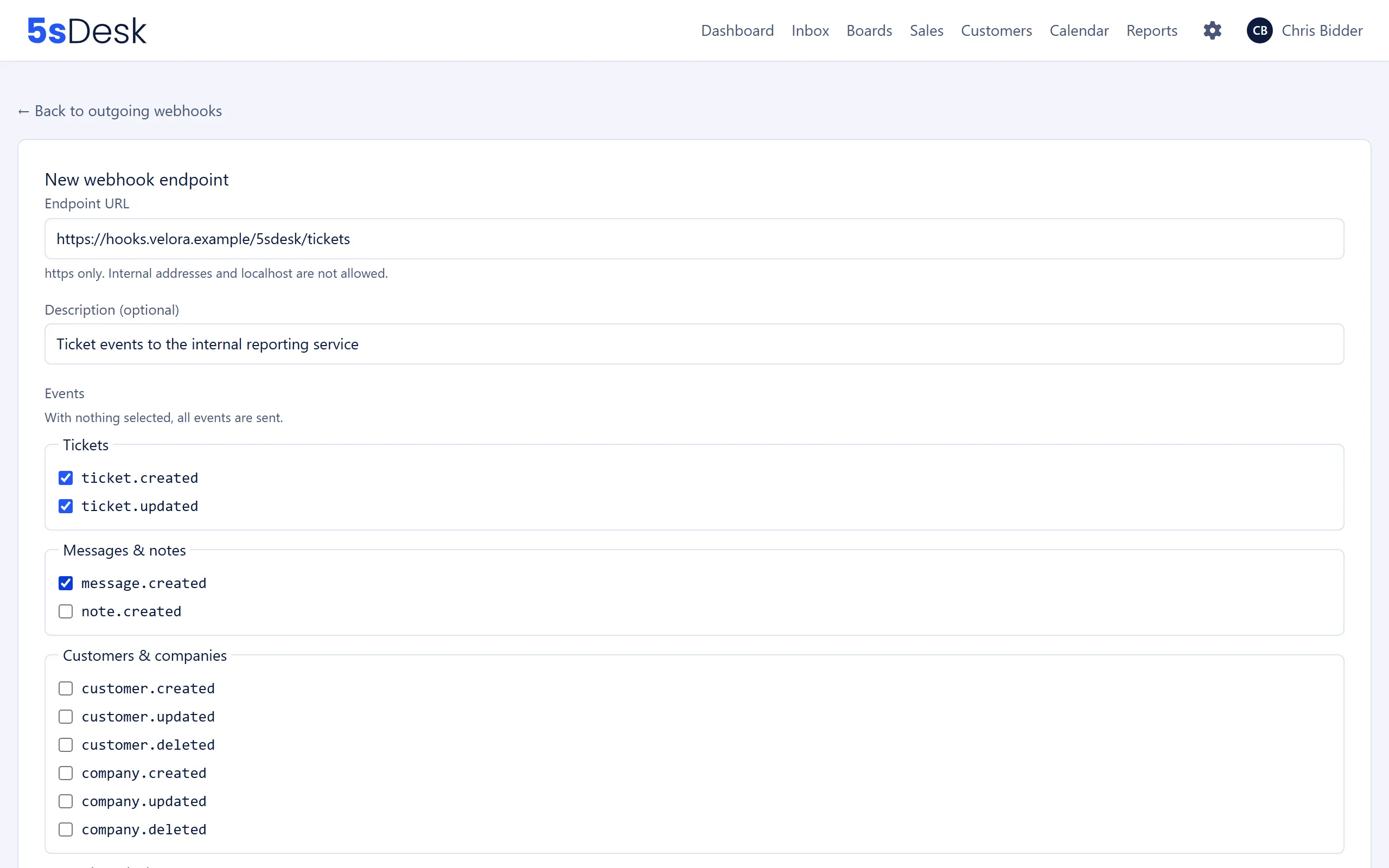
Section titled ““New webhook endpoint” and “Edit webhook endpoint” form”| Field | Meaning | Default |
|---|---|---|
| “Endpoint URL” | The address 5sDesk sends to. “https only. Internal addresses and localhost are not allowed.” Up to 2,048 characters, no credentials in the URL. | empty |
| “Description (optional)” | Free text to help you recognise the endpoint, up to 200 characters. | empty |
| “Events” | One checkbox per event, grouped by area. “With nothing selected, all events are sent.” | nothing selected (all) |
| Checkbox “I understand that personal data (including customer names, email addresses and message texts) is transferred to this endpoint, and that a legal basis must exist for it.” | Required every time you save, including when editing. Without the tick: “Please confirm the data transfer.”. | not ticked |
Events per group:
| Group | Events |
|---|---|
| “Tickets” | ticket.created, ticket.updated |
| “Messages & notes” | message.created, note.created |
| “Customers & companies” | customer.created, customer.updated, customer.deleted, company.created, company.updated, company.deleted |
| “Cards & deals” | card.created, card.updated, card.moved, card.archived, card.unarchived |
Rejected addresses produce messages such as “Only https addresses are allowed.”, “Internal addresses and localhost are not allowed as endpoints.”, “Username and password in the URL are not allowed.” or “The URL’s host cannot be resolved.”.
Secret
Section titled “Secret”After you create an endpoint, the “Endpoint created” block appears: “The secret is shown only this once. Use it to verify the signature in the X-5sDesk-Signature header.” Use “Copy” to transfer it to your system.
After “Rotate secret”, “New secret generated” appears: “The previous secret stays valid for 24 hours – both signatures are sent during that window so you can switch over calmly.”
“Recent deliveries” page
Section titled ““Recent deliveries” page”Shows the last 50 deliveries to this endpoint. “Successful deliveries are kept for 7 days, permanently failed ones for 30 days.”
| Column | Content |
|---|---|
| “Event” | Event type and time; for deliveries re-sent manually, the note “Re-sent”. |
| “Status” | “Waiting”, “Running”, “Failed”, “Delivered” or “Given up”, plus the HTTP status and the last error message. |
| “Attempts” | Number of attempts; for “Failed”, also “Next attempt:”. |
| “Last attempt” | Time and duration in milliseconds. |
“Show payload” expands the data that was sent. “Send again” creates a new delivery with exactly the same content (“Delivery queued again.”). This also works for entries that have already been delivered or given up.
Step by step
Section titled “Step by step”- Click “New endpoint”.
- Enter your receiver’s “Endpoint URL” (https).
- Under “Events”, select only the types your system processes. If you select nothing, it receives everything.
- Tick the data transfer confirmation and click “Save”.
- Copy the secret shown into your system and use it to verify the signature of every request.
- Click “Test” in the list. Your system should receive the
pingevent and respond with a success status.
Effects
Section titled “Effects”- Every subscribed event creates one delivery per active endpoint. 5sDesk checks for due deliveries roughly every 15 seconds. A request may take no more than 10 seconds, otherwise it counts as failed.
- If a delivery fails, 5sDesk retries it up to five times at increasing intervals (1 minute, 5 minutes, 30 minutes, 2 hours, 12 hours, each with slight random variation). After that its status is “Given up”.
- Retries send exactly the same content as the first attempt. Your system should identify events by the event ID included in each request, because a delivery can arrive more than once and the order is not guaranteed.
- Bulk operations do not trigger webhooks: imports from Freshdesk or mailboxes, the CSV import of customers and companies including “Undo”, demo data, resetting the organisation and duplicating a board.
- The tag bulk action in the customer and company lists (“Add tags” or “Remove tags”) is different: it triggers a separate
customer.updatedorcompany.updatedfor every record whose tags actually changed. With many records, you’ll receive a correspondingly large number of events. - Merging duplicate customers creates
customer.deletedfor the duplicate that is removed andcustomer.updatedfor the customer you keep. - Changes to a customer’s additional email addresses (“Add”, “Remove address”, “Make primary address”) each trigger
customer.updated.
See also
Section titled “See also”- API & integrations: API keys your system can use to fetch details about a reported event. The
webhooks:managepermission lets you manage endpoints through the API. - Data protection and third-party services: what to consider when transferring personal data to your own systems.
- Forms: lead forms create tickets, customers and cards, which also trigger webhooks.