
Sales settings: close reasons, lead sources, deal numbers
On this page you manage the selection lists for deals in your sales pipelines (close reasons and lead sources) and the prefix of the deal numbers. Only admins can see this page.
Where to find the page
Section titled “Where to find the page”Administration › Settings › Boards & AI › “Sales”.
Settings at a glance
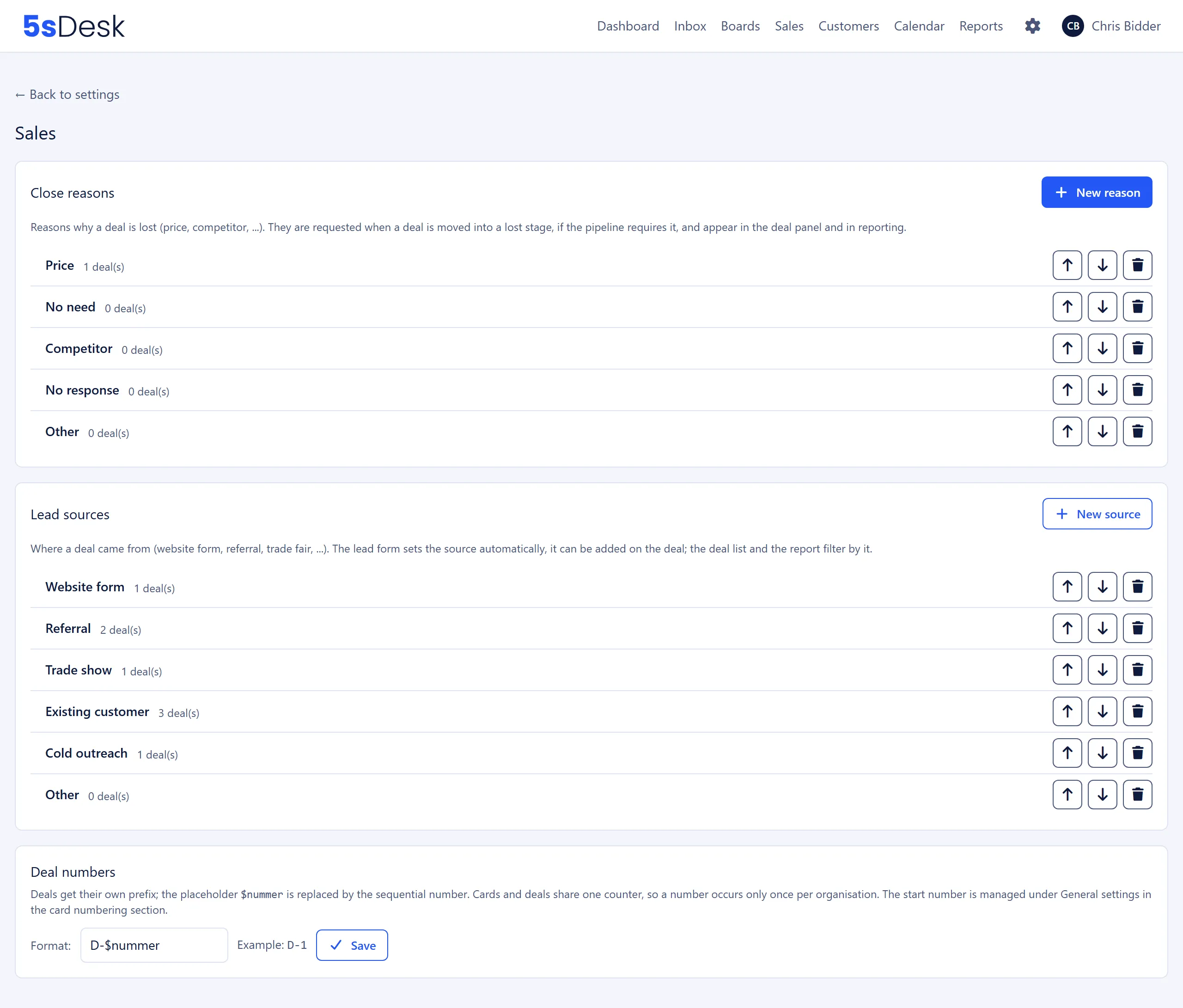
Section titled “Settings at a glance”The page has three sections: “Close reasons”, “Lead sources” and “Deal numbers”.
Close reasons
Section titled “Close reasons”The note above the list reads: “Reasons why a deal is lost (price, competitor, …). They are requested when a deal is moved into a lost stage, if the pipeline requires it, and appear in the deal panel and in reporting.”
Each entry shows the name and, next to it, how many deals use it (“3 deal(s)”).
| Field | Meaning | Default |
|---|---|---|
| “Name” | Name of the reason. Required, up to 60 characters, unique within the organisation. | empty |
Every new organisation starts with five reasons in this order (in the language the organisation was created in): Price, No need, Competitor, No response, Other.
| Action | Effect |
|---|---|
| “New reason” | Opens “Create close reason”. With “Save”, the reason is added to the end of the list. |
| Click on the name | Opens “Edit close reason”. |
| Up arrow, down arrow | Moves the reason up or down one position. The order also applies to the selection in the deal panel. |
| Bin | Deletes the reason after the prompt “Delete this close reason?”. Only possible if no deal uses the reason. |
Lead sources
Section titled “Lead sources”The note above the list reads: “Where a deal came from (website form, referral, trade fair, …). The lead form sets the source automatically, it can be added on the deal; the deal list and the report filter by it.”
The list works just like the close reasons: name with the number of deals, “New source” opens “Create lead source”, clicking the name opens “Edit lead source”, the arrows change the order, and the bin asks “Delete this lead source?”.
| Field | Meaning | Default |
|---|---|---|
| “Name” | Name of the source. Required, up to 60 characters, unique regardless of upper and lower case. | empty |
Default sources of a new organisation, in this order (in the language the organisation was created in): Website form, Referral, Trade show, Existing customer, Cold outreach, Other.
Deal numbers
Section titled “Deal numbers”The note in this section reads: “Deals get their own prefix; the placeholder $nummer is replaced by the sequential number. Cards and deals share one counter, so a number occurs only once per organisation. The start number is managed under General settings in the card numbering section.”
| Field | Meaning | Default |
|---|---|---|
| “Format:” | Pattern for the deal number. Must contain the placeholder $nummer, otherwise you see “The format must contain the placeholder $nummer.”. |
D-$nummer |
| “Example:” | Preview that updates as you type. Shows the first number that would be assigned with the current start number (so D-1 with start number 1). |
“Save” confirms with “Deal numbering saved.”.
Effects
Section titled “Effects”- Required reason per pipeline: whether a reason is requested when a deal is lost is set by the pipeline itself (the “Lost reason required” switch in the pipeline settings). If it is on, 5sDesk requires the reason when a deal is moved into a lost stage, when its status changes and when it moves into the lost stage of another pipeline. If it is off, the “Lost reason” field in the deal panel stays optional and can be filled in later.
- The reason is reset: if a lost deal moves back into an open stage or into “Won”, 5sDesk deletes the lost reason on the deal.
- Lead source from forms: if a lead form targets a pipeline, the new deal gets the “Lead source of the deal” chosen there. For existing deals, you can add it in the deal panel.
- Deal numbers are not stored but built from the format and the counter every time they are displayed. If you change the format, all existing deals immediately appear with the new prefix too. The same applies to a changed start number.
- One counter for cards and deals:
K-17andD-18can exist side by side, butK-17andD-17can’t. So the number itself is unique, and only the prefix tells a card from a deal.
See also
Section titled “See also”- Sales: pipelines, lost reason per pipeline, weighted totals and the deal panel.
- General settings: start number and format of the card numbering, which shares its counter with deals.
- Forms: lead forms that create deals with a lead source.