
Duplicate customers/companies
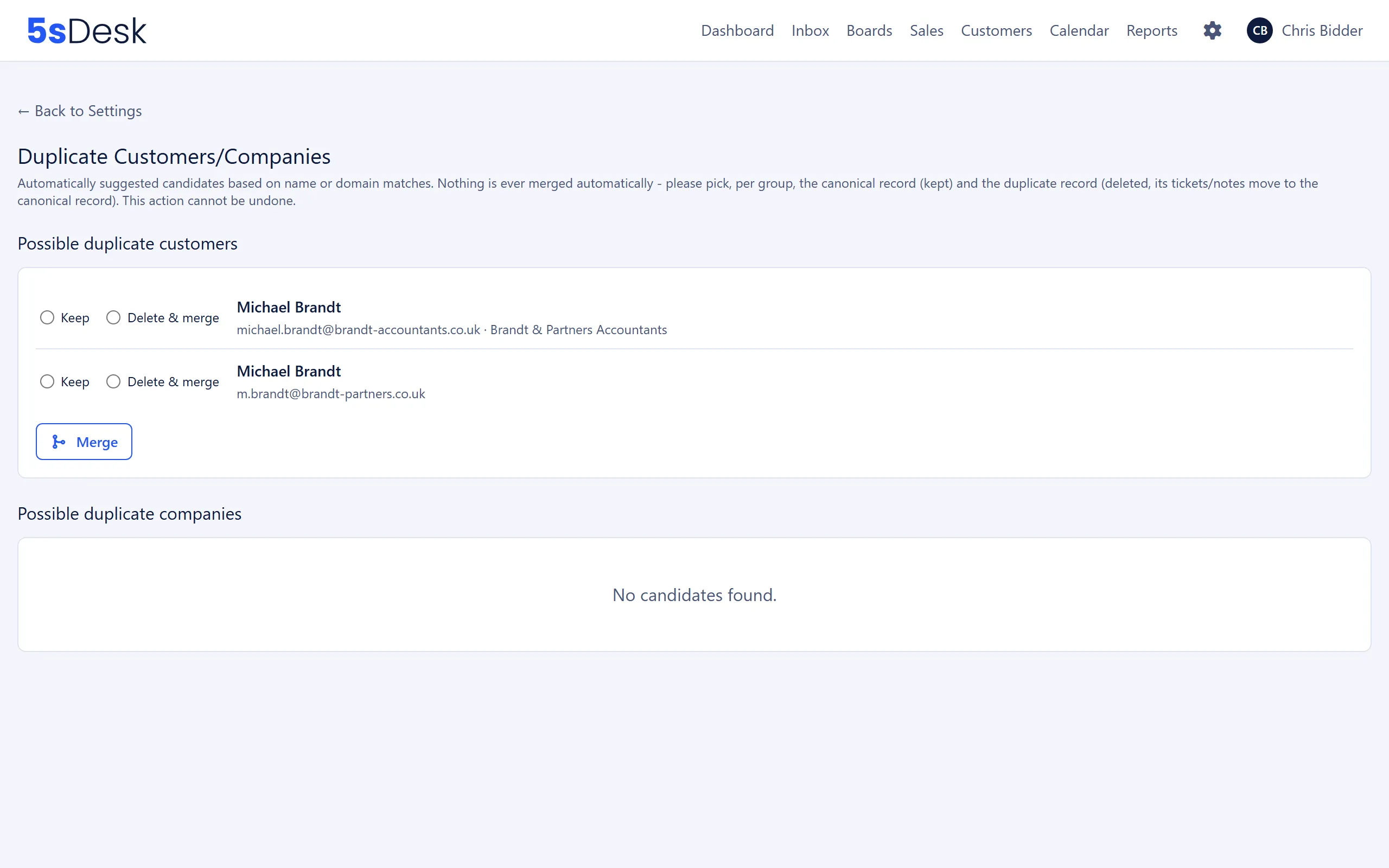
This page suggests customers and companies in the CRM that may have been created more than once, and merges two records at a time on your instruction. 5sDesk never merges automatically. Only admins can see this page.
Where to find the page
Section titled “Where to find the page”Administration › Settings › CRM › “Duplicate customers/companies”.
How candidates are found
Section titled “How candidates are found”The page shows two lists: “Possible duplicate customers” and “Possible duplicate companies”. If there is nothing to show, it says “No candidates found.”
| Area | Criterion |
|---|---|
| Customers | Same name, compared case-insensitively and ignoring leading and trailing spaces. The comparison uses “first name last name”, or the display name for customers without these details. The company plays no part in the comparison. |
| Companies | Same name (normalised the same way) or a shared domain. The main domain and all domain aliases count. Free email domains such as gmail.com or web.de are ignored. |
For companies, each group shows why it is suggested: “Match: Name”, “Match: Domain” or both. Companies without a domain are marked “No domain on file”.
How to do it
Section titled “How to do it”- In a group, select “Keep” for the record you want to keep.
- Select “Delete & merge” for the record that should disappear.
- Click “Merge” and confirm the prompt “Really merge this customer? This cannot be undone.” or “Really merge this company? …”.
- The page reports the result, for example “Customers merged: 3 ticket(s) and 1 note(s) transferred. anke@example.com stay(s) as additional address(es).” or “Companies merged: 4 customer(s) and 2 note(s) transferred.”
Each run processes exactly one pair. If a group contains three or more records, repeat the process. The two selections must point to different records, otherwise “Please select two different customers.” or “Please select two different companies.” appears.
What happens when you merge
Section titled “What happens when you merge”Customers
Section titled “Customers”| Moves to the customer you keep | Is lost |
|---|---|
| Tickets (conversations) | All master data of the duplicate: phone, position, custom fields, VIP flag, company assignment. The master data of the customer you keep is not changed. |
| Customer notes | Open customer portal login links of the duplicate. |
| Cards and deals, appointments and activities | References in other records’ reference custom fields that point to the duplicate. They point to nothing afterwards. |
| Form submissions that created the duplicate | |
| Recipient entries in bulk emails. If the person was in the same bulk email under both records, the entry of the customer you keep remains. | |
| Tags. The customer you keep then has the tags of both records. | |
| The marketing consent history. Both histories are combined. The most recent confirmed decision from either record applies. An open confirmation link of the duplicate only moves over if the customer you keep has none open. | |
| All of the duplicate’s email addresses. They become additional email addresses of the customer you keep. |
Companies
Section titled “Companies”| Moves to the company you keep | Is lost |
|---|---|
| The duplicate’s customers | Links from cards and deals to the duplicate. |
| Company notes | The duplicate’s master data: address, custom fields, company note text in the profile. The company you keep is not changed. |
| Tags. The company you keep then has the tags of both records. | |
| The duplicate’s main domain and domain aliases become aliases of the company you keep. | Domains that already belong to a third company are skipped. The message lists them: “These domain(s) already belonged to another company and were ignored: …” |
Effects
Section titled “Effects”- Tickets and notes then appear in the record you kept. The CRM sidebar in the inbox shows the customer you kept.
- New emails, customer portal logins and form submissions from the duplicate’s address end up with the customer you kept instead of creating the duplicate again.
- The marketing consent of the customer you keep may change: the most recent confirmed decision from either record applies.
- New customers with an email address at a transferred domain (from appointment bookings, forms or “Add to CRM” on a ticket) are assigned to the company you kept from now on, because the domain was taken over as an alias.
- If the duplicate had values in custom fields that the record you keep lacks, you need to copy them over by hand beforehand.
See also
Section titled “See also”- CRM: customer and company records, additional email addresses, tags, domains and aliases.
- Custom fields: your own fields, whose values are not transferred when you merge.
- Import/Export: backing up master data before a merge.
- Data protection and third-party services: handling the consent history.